


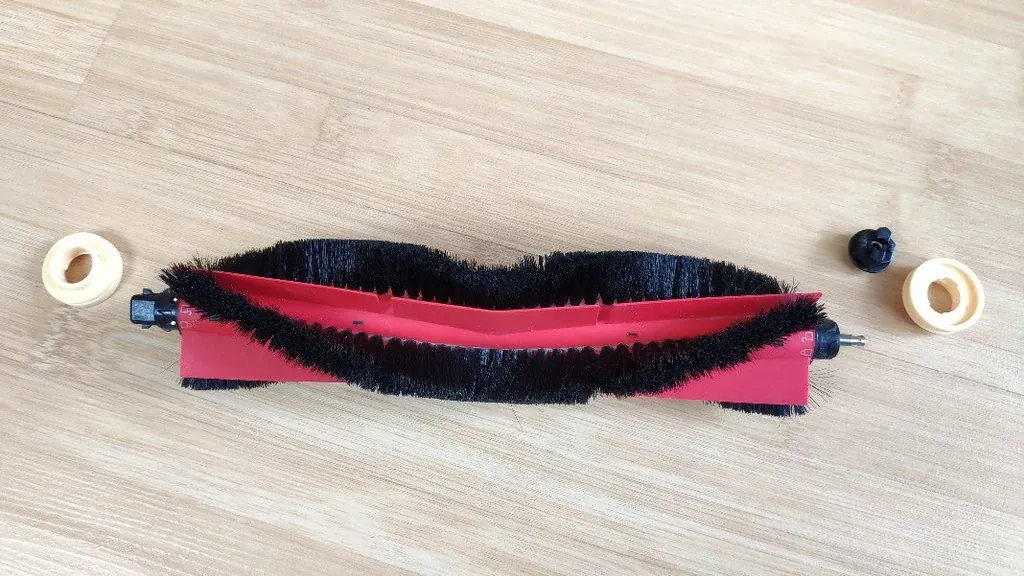
Robot vacuum maintenance comes down to seven jobs: empty the bin, clean the filter, clear the main brush, clean the side brush, free the wheels, wipe the sensors and clean the charging contacts. Done on a schedule, they take a few minutes a week.
This guide gives the steps, how often to do each, and the signs that a part needs replacing. Always follow your model’s manual where it differs.
Table of Contents
How often should you maintain a robot vacuum?
Empty the bin after every run or two, clean the brushes and filter weekly, and replace worn parts at the interval the maker recommends. Homes with pets or long hair need more frequent cleaning.
| Task | How often | More often if |
|---|---|---|
| Empty the dustbin | After every one or two runs | You have pets |
| Tap out the filter | Weekly | The home is dusty |
| Clear the main brush | Weekly | Long hair or thread on floors |
| Clean the side brush | Every two weeks | It looks bent or tangled |
| Check the wheels | Monthly | The robot drifts or drags |
| Wipe sensors and contacts | Monthly | You see navigation or charging errors |
| Replace filter and brushes | As the manual states | Suction drops or bristles wear |
What are the 7 steps of robot vacuum maintenance?
Switch the robot off and take it off the dock before you start. You need a dry cloth, a soft brush and scissors or the cutting tool supplied with the robot.
- Empty the dustbin. Tip it into the trash and wipe out the inside.
- Clean the filter. Tap it gently against the bin. Rinse only if the manual says it is washable, and dry it fully.
- Clear the main brush. Lift it out, cut away hair and pull it free from both ends.
- Clean the side brush. Unclip or unscrew it and remove anything wound around the base.
- Free the wheels. Pull hair from the front caster and check the drive wheels turn freely.
- Wipe the sensors. Use a dry cloth on the cliff sensors underneath and any window on top.
- Clean the charging contacts. Wipe the metal contacts on the robot and the dock with a dry cloth.
Consumer Reports has a guide on how to clean a robotic vacuum.
How do you clean the filter safely?
Tap dust out of the filter and brush it lightly. Do not wash it unless the manual says it is washable, because water ruins many paper filters.
- Tap it over a bin, outdoors if you can.
- Use a soft brush on the pleats, without pressing hard.
- If it is washable, rinse with plain water only and let it air-dry completely, usually for a full day.
- Never refit a damp filter.
- Keep a spare so the robot can keep running while one dries.
What should you never do during robot vacuum maintenance?
Never use water or cleaning sprays on the robot itself, and never run it without a filter. Most damage comes from moisture and from parts being refitted wrongly.
- Do not rinse the robot or the dustbin unless the manual says the bin is washable.
- Do not use detergents, solvents or abrasive pads.
- Do not spray anything on sensors or charging contacts.
- Do not run the robot with the brush or filter missing.
- Do not let it vacuum liquids, unless it is a mopping model designed for that.
How do you know when parts need replacing?
Replace a part when cleaning no longer restores performance. Each part shows wear in its own way.
| Part | Signs it needs replacing |
|---|---|
| Filter | Still grey after tapping, torn pleats, weaker suction |
| Main brush | Bristles worn flat or rubber fins split |
| Side brush | Arms bent, splayed or missing |
| Battery | Much shorter runs, or the robot dies before returning to the dock |
| Dock bag, on self-empty models | The app or dock shows a full warning |
Check the price and availability of these parts before choosing a robot. Our guide to a robot vacuum for small apartment covers running costs.
How do you fix common problems with maintenance?
Most error messages clear after a targeted clean. Match the problem to the part.
| Problem | Check |
|---|---|
| Weak suction | Full bin, clogged filter, blocked intake |
| Leaves debris behind | Tangled or worn main brush |
| Drives in circles or drifts | Hair around a wheel |
| Stops at dark rugs or edges | Dirty cliff sensors |
| Will not charge | Dirty contacts on robot or dock |
| Louder than usual | Debris in the brush housing |
Frequently asked questions
How often should I clean my robot vacuum?
Empty the bin after every run or two, clean the filter and main brush weekly, and wipe the sensors and charging contacts monthly. Pet owners should do it more often.
Can I wash a robot vacuum filter?
Only if the manual says it is washable. If so, rinse with plain water and let it dry completely before refitting. Many filters must only be tapped clean.
Why is my robot vacuum not picking up dirt?
The usual causes are a full bin, a clogged filter or hair wrapped around the main brush. Clean all three and check the intake for blockages.
How long do robot vacuum filters and brushes last?
It depends on the model and how often it runs. Follow the replacement interval in the manual, and replace sooner if cleaning no longer restores performance.
How do I clean the sensors on a robot vacuum?
Wipe them with a clean, dry cloth. Do not use water or cleaning sprays. The cliff sensors are underneath, near the edge of the robot.
Why does my robot vacuum keep saying it is stuck?
Hair around a wheel or brush is a common cause. Turn it over, free the wheels and brushes, and wipe the cliff sensors.
About the author: Hamza Javaid is a web developer and the editor of InnovateTechie. Read our editorial policy.
Last updated: October 2026. Prices, plans and app menus change often, so confirm details on the manufacturer’s page before you buy.
