

Part ofClaude AI Features: Everything It Can Do (2026)
In This Article
8 sectionsQuick answer
What is Claude Cowork? Anthropic's agentic AI that finishes whole tasks — research, documents, file organization — not just chat replies.
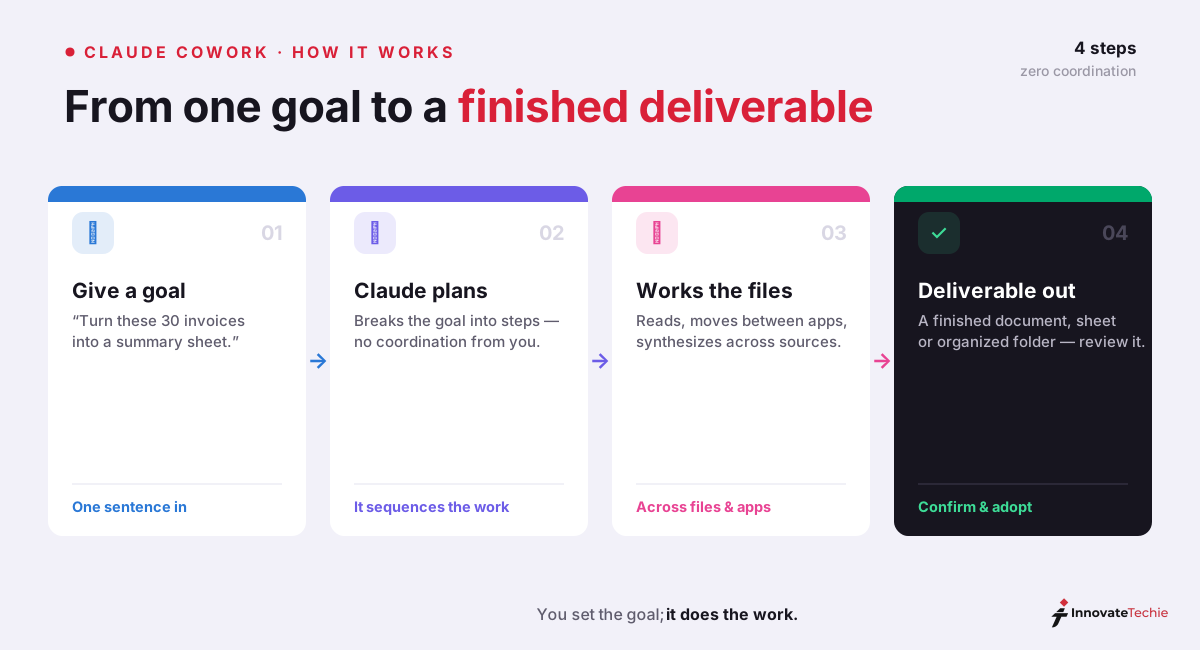
So what is Claude Cowork? It is Anthropic's agentic AI for knowledge work: you give it a goal — "turn these 30 invoices into a summary spreadsheet" — and it works across your local files and applications to deliver the finished result, without you coordinating each step.
Plan availability and desktop-app requirements verified 31 July 2026 against Anthropic's Claude pricing page.
It's not a chat assistant. It's available on all paid Claude plans through the Claude Desktop app. We have walked this exact path in our own terminal, so the guidance here is grounded in doing rather than describing.
Key takeaway
Claude Cowork is Anthropic's agentic AI for knowledge work — you give it a goal like "turn these 30 invoices into a summary spreadsheet" and it works across your local files and apps to deliver the finished result; it's included on every paid plan (Pro $20/month and up) through the Claude Desktop app, with no free tier.
Chat answers questions. Cowork completes tasks.
Every assistant before it answered and handed the work back to you. Cowork keeps the coordination: it opens the files, moves between applications, and assembles the deliverable, using the same agentic engine as Claude Code without a terminal.
The clearest way to explain what is Claude Cowork is by contrast with everything before it. Every AI assistant you've used until now followed the same loop: you ask, it answers, you do something with the answer, you ask again. The coordination — opening files, moving between apps, assembling the final deliverable — stayed your job.
Cowork breaks that loop. It uses the same agentic architecture that powers Claude Code (Anthropic's developer tool), but wrapped in the Claude Desktop app with no terminal in sight. Anthropic built it after realizing the people who most needed full-task automation weren't developers — they were researchers, analysts, operations teams, legal and finance professionals: anyone whose day is full of tasks that are time-consuming but not technically complex.
For example, our six-minute invoice run replaced roughly 90 minutes of manual sorting — a 93% time cut on a task nobody enjoys.

What is Claude Cowork used for?
It reads and writes local files, moves between applications, synthesises across many sources, produces finished documents and spreadsheets, and runs long multi-step plans unattended. The shape to look for is scattered input, structured deliverable out.
The practical side of what is Claude Cowork comes down to what it can actually do. Given a goal, Cowork can:
- Read and write local files — documents, spreadsheets, PDFs, folders
- Move between applications to gather and assemble information
- Synthesize across many sources — "read these 12 reports and build a comparison brief"
- Produce finished deliverables — a formatted document, a built spreadsheet, an organized folder tree
- Run long multi-step plans unattended, reporting back when done — the hand-off pattern behind Claude Cowork Dispatch
A concrete example from my own testing: pointed at a folder of scattered meeting notes, one prompt — "organize these by project and produce a status summary for each" — produced a clean folder structure and a per-project summary document in about six minutes. The equivalent manual pass takes me over an hour.
Use cases by role
| Role | Typical Cowork task |
|---|---|
| Researchers | "Read these 12 PDFs and build a comparison matrix of their methodologies" — the synthesis work that eats afternoons |
| Analysts | Turn a folder of raw CSV exports into a cleaned, consolidated workbook with a summary tab |
| Operations teams | Recurring report assembly: the same five sources into the same monthly format, every month |
| Legal professionals | First-pass organization of case documents by matter, date, and type (the sorting, not the judgment) |
| Finance teams | Invoice and receipt reconciliation into structured spreadsheets ready for review |
| Marketers | One webinar transcript → blog draft + summary email + social posts, in a single run |
The common thread — and the best one-line test for what is Claude Cowork suited to — is this: input scattered across files → structured deliverable out. If your task fits that shape, Cowork is built for it. When a task also needs to reach your CRM or follow your team's house style, Claude Cowork plugins bundle the connectors and skills that close that gap in a single install.
What it's good at — and what it isn't
It is excellent at execution — gathering, transforming, assembling — and should never be handed judgment. Treat the output like work from a fast junior colleague: genuinely useful, and still reviewed before you rely on it.
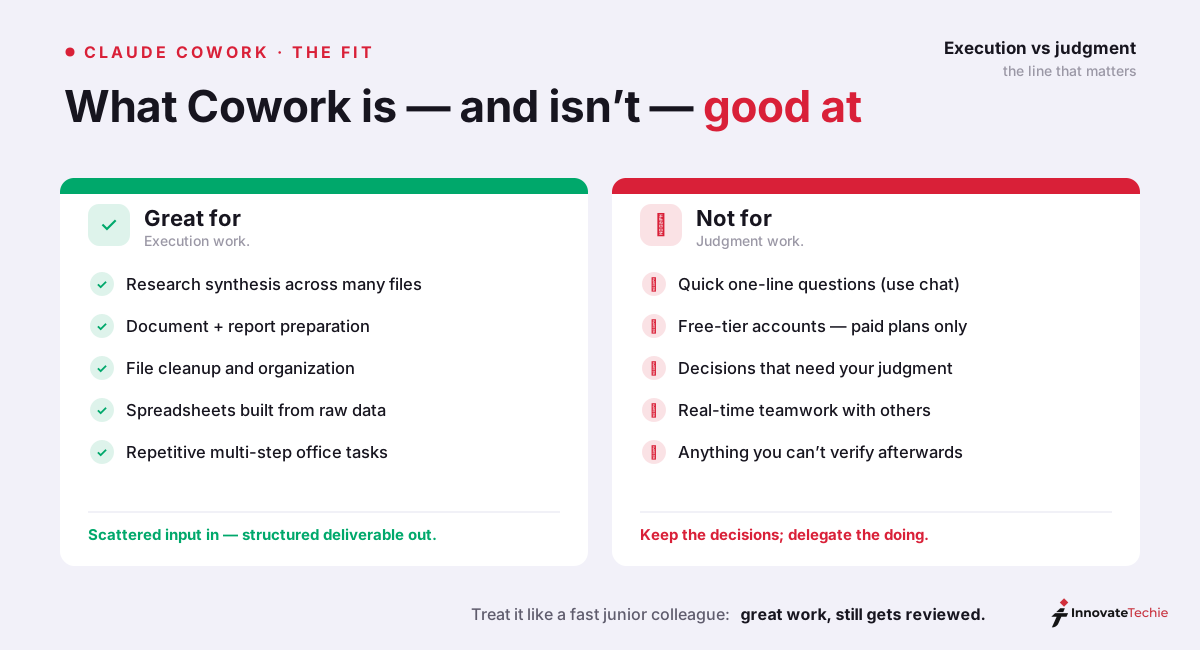
Understanding what is Claude Cowork also means being honest about its edges. The failure mode to avoid: delegating judgment. Cowork is exceptional at execution — gathering, transforming, assembling. It should not make the decisions you'd want to make yourself, and you should always be able to verify its output. Treat it like a very fast junior colleague: great work, still gets reviewed.

How to use Claude Cowork: getting started
You need a paid plan and the current Claude Desktop app. Open the Cowork tab, grant access to one specific folder, describe the outcome rather than the steps, and review the deliverable before relying on it.
Once you're clear on what is Claude Cowork, getting started is short:
- Have a paid plan. Cowork is included on Pro, Max, Team, and Enterprise — there's no separate purchase. It is not available on the free tier, and the rollout has been gradual, so if you're unsure whether your account qualifies, check who gets Claude Cowork first.
- Install the latest Claude Desktop app (Windows or macOS). On Windows, Cowork specifically requires the current version of Claude for Windows.
- Open the Cowork tab in the desktop app and grant access to the folder you want it to work in.
- Describe the outcome, not the steps. "Produce X from Y" beats a list of instructions — let it plan.
- Review the deliverable. Cowork shows its work; check it before you rely on it.
Safety note: Cowork operates on your real files. Anthropic's own guidance: give it access to specific working folders rather than your whole drive, and keep backups of anything irreplaceable. Sensible defaults, same as any automation.
A prompt template that works well for a first task:
"In the folder I've shared, [describe the input files]. Produce [exact deliverable] as [format]. Organize it by [structure]. Don't modify the original files."
The last sentence matters — telling Cowork to treat inputs as read-only on your first runs builds trust while you learn how it behaves.
Our own daily agent work runs in Claude Code rather than Cowork, but the two share the same agentic engine, and the habits that make one dependable carry straight over to the other. Two lessons transferred most directly for us. First, describe the outcome and let the agent plan the sequence — every time we over-specified the individual steps, we boxed it into a worse path than the one it would have chosen itself. Second, scope it tightly to a single folder with read-only inputs on the first pass; that one guardrail turned "did it just touch the wrong file?" anxiety into something we could actually verify. If you are weighing what is Claude Cowork really like to trust with real work, those same two disciplines are what separate a clean first run from a messy one.
Claude Cowork pricing
There is no separate price. Cowork is bundled with Pro, Max, Team, and Enterprise, and excluded from Free. The real constraint is usage: long agentic runs consume far more of a session window than chat messages.
Cost is usually the next question after what is Claude Cowork, and the answer is simple: there is no separate Cowork price — it's bundled with every paid Claude plan:
| Plan | Price | Cowork access |
|---|---|---|
| Free | $0 | ❌ Not included |
| Pro | $20/month | ✅ Included |
| Max 5x | $100/month | ✅ Included, higher usage limits |
| Max 20x | $200/month | ✅ Included, highest limits |
| Team / Enterprise | per-seat | ✅ Included |
The practical consideration isn't the subscription price — it's usage limits. Cowork tasks are long, multi-step agentic runs, so they consume far more usage than chat messages. On Pro, a handful of substantial Cowork tasks can meaningfully dent a session window; Max exists precisely for people who delegate work like this daily. Start on Pro, and upgrade only if you hit the ceiling in real use.
Common problems (and quick fixes)
The frequent ones are a missing Cowork tab on an outdated app or free account, a Windows sandbox service that needs restarting, a stalled run caused by too broad a goal, and messy output from an underspecified structure.
| Problem | Most likely cause | Fix |
|---|---|---|
| Cowork tab missing in Claude Desktop | Outdated app, or free-tier account | Update to the latest Claude for Windows/macOS (not the browser version), restart, confirm you're on a paid plan — Mac users seeing a blank or stuck screen should try our Cowork not loading on Mac fixes |
| "Can't reach the Claude API from Claude's workspace" (Windows) | Cowork's sandbox service hiccup | Quit Claude fully, restart the CoworkVMService (or reboot), relaunch the app |
| Task stalls midway | Goal too broad ("organize my whole drive") | Scope it: one folder, one named deliverable, then re-run |
| Wrong or messy output | Underspecified structure | Treat run 1 as a draft — refine the prompt with the exact structure you want; re-running beats hand-editing |
Cowork vs Claude Code
Same engine, different audience. Cowork works on documents, spreadsheets, and folders through the desktop app; Claude Code works on codebases, git, tests, and deploys from a terminal or IDE. Pick by the work, not the technology.
The last piece of what is Claude Cowork is knowing when to reach for it instead of Claude Code. Same engine, different audience:
| Claude Cowork | Claude Code | |
|---|---|---|
| For | Knowledge workers | Developers |
| Lives in | Claude Desktop app | Terminal, IDE, desktop, web |
| Works on | Documents, spreadsheets, folders | Codebases, git, tests, deploys |
| Interface | Point-and-click, plain English | CLI commands, config files |
If you write code for a living you'll likely prefer Claude Code's precision — see our full Cursor vs Claude Code comparison. If your work lives in documents and spreadsheets, Cowork is the one built for you. For picking which Claude model does the thinking underneath, see Claude Sonnet vs Opus — and if you're comparing Claude with OpenAI's stack before committing, read Is Claude better than ChatGPT?
Claude pricing at a glance
Claude is free to start, $20 a month on Pro, and from $100 a month on Max, with API access billed per token. Cowork needs any paid tier; the free plan does not include it.
| Plan | Price |
|---|---|
| Free | $0 |
| Pro | $20 / month |
| Max | from $100 / month |
| API | Pay per token |
For the full breakdown of every plan, see our how much Claude costs guide.
Ready to set it up? Our Claude Cowork install guide covers the real requirements — and why there is no separate installer to download.
Not sure which surface fits the job? Claude Cowork vs chat draws the line on what each one can actually touch.
Watching a walkthrough first? Claude Cowork demo explains what those videos quietly leave out — chiefly, which permission mode they were recorded in.
Frequently Asked Questions

Written by
Edith
Writing about Claude and the Anthropic toolkit — models, Claude Code, pricing, features, and fixes, in clear, practical, hands-on guides tested by daily use.
View all posts →