


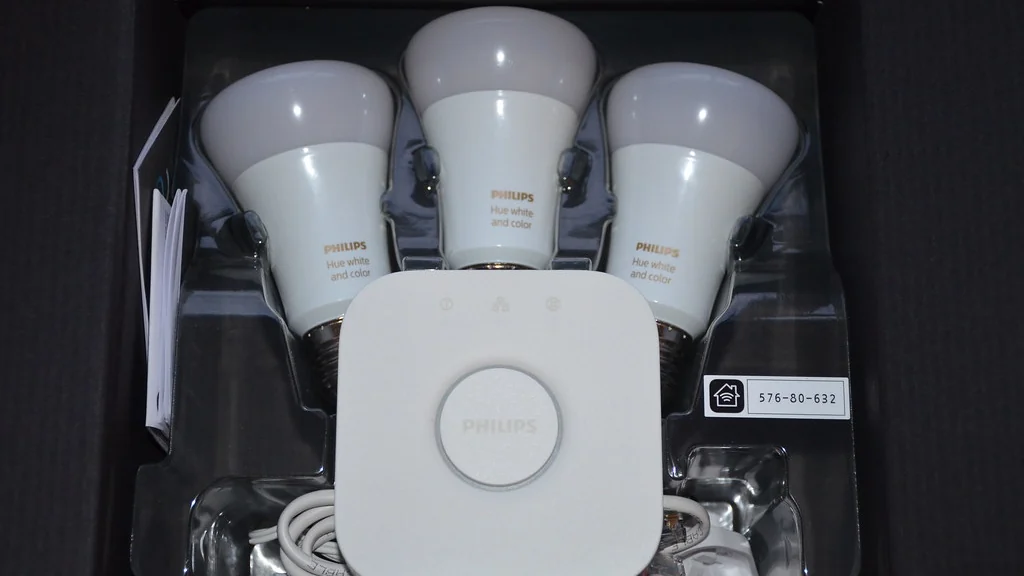
You can build a useful smart home on a budget by starting with one voice assistant or app, two or three Wi-Fi smart plugs and a few smart bulbs, then adding a camera or sensor only when you have a clear use for it. Choose devices that work without a hub and without a paid plan, and the only ongoing cost is the electricity they use.
This guide explains what to buy first, what to skip, and how to avoid the monthly fees that make a cheap device expensive over time. It is written for renters, first-time buyers and anyone setting up a home for a parent.
Table of Contents
What do you need for a smart home on a budget?
A smart home on a budget needs three things: a way to control devices, a few devices that solve a daily annoyance, and a Wi-Fi network that reaches them. It does not need a hub, a subscription or a matching set from one brand.

Most people get the best value from this order:
- A controller you already own. The free Amazon Alexa, Google Home or Apple Home app on your phone is enough to begin. A smart speaker is optional.
- Smart plugs. They turn lamps, fans and coffee makers on and off on a schedule, and they are usually the cheapest smart device you can buy.
- Smart bulbs. Use them where you want dimming or a change of color temperature and there is no dimmer switch.
- One security device. A single indoor camera or a door sensor, chosen for local storage so there is no monthly fee.
- Energy devices. A smart thermostat or an energy-monitoring plug, if you pay the utility bill and are allowed to install one.
How much does a smart home on a budget cost?
A starter setup is a small one-time purchase when you avoid hubs and subscriptions. The total depends far more on how many rooms you cover than on which brand you choose.
The table below shows three planning tiers. The device counts are suggestions, and the prices are left for you to check, because smart home prices change often and drop sharply during sales.
| Tier | What it includes | Hub needed | Monthly fee | Typical total |
|---|---|---|---|---|
| Starter (one room) | Phone app, 2 smart plugs, 2 smart bulbs | No | None | Check current prices |
| Core (small apartment) | Starter tier, plus 1 smart speaker and 1 indoor camera with microSD storage | No | None, with local storage | Check current prices |
| Whole home | Core tier, plus a smart thermostat, door sensors and a video doorbell | Depends on the sensors | None to optional | Check current prices |
Which smart home ecosystem should a beginner choose?
Choose the ecosystem that matches the phone and speaker you already have, because that costs nothing extra and keeps a smart home on a budget. Amazon Alexa and Google Home both work with Android and iPhone, while Apple Home works only with Apple devices.
| Ecosystem | Works with | Good fit for | Watch out for |
|---|---|---|---|
| Amazon Alexa | Android and iPhone | The widest choice of low-cost devices and speakers | Check which features need a paid Amazon service |
| Google Home | Android and iPhone | Households that already use Google accounts and Nest devices | Check which speakers are currently on sale |
| Apple Home | iPhone, iPad and Mac only | All-Apple households that value on-device privacy controls | Remote control and automations need a home hub such as an Apple TV or HomePod |
You are not locked in for life. Devices that carry the Matter logo are designed to work across Alexa, Google Home, Apple Home and Samsung SmartThings, so a Matter plug bought today can move with you to another ecosystem later.
Do you need a hub for a smart home?
No. Wi-Fi smart plugs, bulbs and cameras connect straight to your router and need no hub. A hub only becomes necessary when you buy devices that use Zigbee, Z-Wave or Thread.
| Connection type | Hub required | What it means for a budget |
|---|---|---|
| Wi-Fi | No | Lowest starting cost. Many budget devices connect only to the 2.4 GHz band, so check your router broadcasts it. |
| Bluetooth | No, but range is short | Fine for one room. Control away from home usually needs a bridge. |
| Zigbee | Yes | Sensors are cheap and batteries last a long time, but you pay for a hub first. Some smart speakers have one built in. |
| Z-Wave | Yes | Reliable for larger homes. The hub adds to the starting cost. |
| Thread (often with Matter) | Yes, a Thread border router | Many recent speakers and streaming boxes include one. |
For a first budget smart home, buy Wi-Fi devices that are also Matter-certified. You get the no-hub price now and wider compatibility later.
How do you avoid monthly fees?
Monthly fees are what break a smart home on a budget. Avoid them by choosing devices that store data locally and keep their core features free. The fee usually hides in cloud video storage, not in the device itself.
Check these five points on the manufacturer’s own product page before you buy:
- Local storage. Does the camera or doorbell record to a microSD card or a base station without a plan?
- Free features. Are motion alerts, live view and person detection included, or do they sit behind a subscription?
- Clip history. How many days of recordings, if any, are free?
- Professional monitoring. Is it optional? A self-monitored system that sends alerts to your phone has no fee.
- Trial periods. Does a free trial start automatically, and what happens when it ends?
A simple way to compare two devices is to add up three years of ownership: the purchase price plus 36 months of any plan you would need. A camera that costs less today can cost more by year two.
What should renters buy, and what should they skip?
Renters should buy devices that plug in, screw into an existing lamp socket or stick on with removable adhesive, and skip anything that needs wiring or drilling. Everything on the buy list leaves with you when you move.
| Renter-safe | Ask your landlord first |
|---|---|
| Smart plugs | Smart thermostats |
| Smart bulbs | Hardwired video doorbells |
| Plug-in indoor cameras | Smart light switches and dimmers |
| Battery door and window sensors with adhesive mounts | Smart locks that replace the deadbolt |
| Smart speakers and displays | Outdoor cameras fixed to the building |
Keep the original parts if your landlord does approve a thermostat or lock, so you can restore them before you leave. Read your lease for rules on cameras in shared hallways and on alterations to the unit.
For more options that need no tools, see our smart home ideas for renters.
Which devices can lower your energy bill?
Smart thermostats and LED smart bulbs have the best-documented savings, while smart plugs save money only when they cut power to something that would otherwise stay on. Savings depend on your climate, your rates and your habits.
- Smart thermostats. ENERGY STAR says almost half of the average household’s annual energy bill goes to heating and cooling, which is why a thermostat is the first place to look. Check with your utility for rebates before you buy.
- LED smart bulbs. LED bulbs use much less electricity than the incandescent bulbs they replace. The saving comes from the LED, and scheduling adds a little more.
- Energy-monitoring plugs. They show how much electricity one appliance uses, which tells you whether it is worth switching off.
A smart plug uses a small amount of standby power itself, so putting one on a device that already draws almost nothing will not pay back.
Our energy saving tech section covers these devices one by one.
How do you set up your first smart devices?
Set up one device completely before you buy the next, starting with a smart plug because it is the simplest. The steps are nearly the same for every brand.
- Install the manufacturer’s app and create an account with a strong, unique password.
- Connect your phone to your home Wi-Fi. Use the 2.4 GHz network if the device asks for it.
- Plug in the device and put it in pairing mode, usually by holding its button until the light blinks.
- Add the device in the app and give it a plain name such as “Bedroom Lamp”.
- Link the manufacturer’s app to Alexa, Google Home or Apple Home, or scan the Matter code if the device has one.
- Create one schedule or routine, for example the lamp turning on at sunset.
- Update the device firmware when the app offers it.
Clear device names matter most when you use voice control. “Turn off the bedroom lamp” works every time. “Turn off plug 2” does not.
Ready-made examples are in our voice assistants and routines section, and ideas for individual devices are in smart plugs and lighting.
What is different when you set up a smart home for an older adult?
For an older adult, choose fewer devices, voice control over apps, and automations that run without anyone needing to remember them. The aim is less effort for the person living there, not more features.
- Voice first. A smart speaker or display lets someone turn on lights or make a call without finding a phone.
- Lights that manage themselves. Motion-activated or scheduled lighting on the route to the bathroom helps at night.
- Shared access. A family member can be added to the same app account or home to help from a distance, with the person’s agreement.
- Privacy and consent. Talk through any camera or sensor before installing it, and keep cameras out of bedrooms and bathrooms.
Smart home devices are not medical devices and do not replace a medical alert system or emergency services. Ask a doctor or occupational therapist about fall risk and safety needs.
See smart home for seniors for device choices and setup help.
How do you keep a low-cost smart home private and secure?
Keep it secure by buying from manufacturers that publish update policies, using unique passwords with two-factor authentication, and installing firmware updates. Price is not a reliable sign of security either way.
- Turn on two-factor authentication in every smart home app that offers it.
- Use a different password for each account, stored in a password manager.
- Check how long the manufacturer promises security updates, on its support page.
- Review the privacy settings for voice recordings and video clips, and delete what you do not need.
- Put smart devices on your router’s guest network if it has one, to keep them apart from your computers.
Our budget home security section looks at cameras and sensors that work without a subscription.
How do you pay less for smart home devices?
Pay less by buying during major sales, choosing multi-packs and adding devices one at a time. Smart plugs and bulbs are usually cheaper per unit in packs of two or four.
- Wait for sales. Smart speakers, plugs and cameras are discounted often, especially around major shopping events.
- Buy multi-packs. Compare the price per device, not the pack price.
- Check bundles carefully. A bundle only saves money if you would have bought every item in it.
- Look for utility rebates. Some energy providers offer rebates on smart thermostats.
- Consider the previous model. Last year’s smart speaker or camera often does the same job for less.
What should you skip when money is tight?
Skip anything that needs a subscription to do its main job, anything that duplicates a device you already own, and anything bought only because it was on sale. A smart home earns its cost through daily use.
- A hub, until you own a device that requires one.
- Color bulbs in rooms where you only ever want white light.
- Smart versions of appliances that a smart plug can already switch on and off.
- A second ecosystem. Two voice assistants in one home cause confusion without adding much.
- Outdoor cameras in a rental where you cannot mount them properly.
Smart home on a budget checklist
- Pick one ecosystem that matches your phone.
- Confirm your router broadcasts a 2.4 GHz network.
- Buy Wi-Fi devices with the Matter logo where possible.
- Check each product page for local storage and free features.
- Add up three years of cost, including any plan.
- Renters: buy plug-in, screw-in and adhesive devices only, unless the landlord agrees.
- Set up and name one device fully before buying the next.
- Turn on two-factor authentication and firmware updates.
Which brands make low-cost smart home devices?
Several well-known brands sell entry-level devices that suit a smart home on a budget. We list them as places to start comparing, not as tested recommendations.
- Smart speakers: Amazon Echo Dot, Google Nest Mini and Apple HomePod mini.
- Smart plugs: TP-Link Kasa, Amazon and Wemo.
- Smart bulbs: Philips Hue, Wyze and Sengled.
- Cameras: Wyze, Blink, Ring and Nest.
As a rough guide, Asurion puts basic smart plugs under $25, smart bulbs under $50 and entry-level speakers and cameras under $100. Prices move often, so check the current listing before you decide.
How should you organize devices once you have a few?
Group devices by room in your app as soon as you own more than three. Groups let you say “turn off the living room” instead of naming each lamp.
- Create one room for each real room in your home.
- Put every plug and bulb in the room where it physically is.
- Name devices by what they control, not by brand.
- Add a group called “Everything” for a single goodnight command.
Every guide on this site
This page is the starting point. Once you know which part of the house you want to change, these guides go deeper on each one.
- Smart home basics: Smart Home Without a Hub: 6 Easy Ways to Start, What Is Matter Smart Home? 7 Simple Facts for Buyers, Smart Device Not Connecting to WiFi? 9 Easy Fixes
- Renters and small spaces: Smart Home Ideas for Renters: 9 Easy No-Drill Upgrades, Smart Lighting for Renters: 7 Easy No-Drill Ideas
- Smart plugs and lighting: Smart Plug Ideas: 12 Easy Routines for Every Room, What Not to Plug Into a Smart Plug: 8 Essential Rules, Smart Bulb vs Smart Plug: 6 Key Differences Explained, Smart Plug for Christmas Lights: 7 Easy Setup Tips
- Budget home security: Security Camera Without Subscription: 7 Essential Checks, Security Cameras Without WiFi: 4 Proven Ways They Work
- Energy saving: Smart Home Devices That Save Money: 6 Best Options, Do Smart Plugs Save Energy? 5 Honest Answers
- Smart home for seniors: Smart Home Devices for Elderly Living Alone: 7 Simple Aids, Alexa for Seniors: 9 Easy Setup Steps for Families
- Voice assistants and routines: Alexa Routines for Beginners: 10 Easy Ideas to Copy, Alexa Routine Not Working? 8 Proven Fixes to Try, Alexa vs Google Home: 7 Key Differences for Beginners
- Smart kitchen and cleaning: Robot Vacuum for Small Apartment: 8 Essential Buying Tips, Robot Vacuum Maintenance: 7 Easy Steps and a Schedule
Frequently asked questions
What’s the cheapest way to start a smart home on a budget?
The cheapest way is one Wi-Fi smart plug controlled from a free phone app. It needs no hub, no speaker and no subscription, and it lets you try schedules and voice control before you spend more.
Can I have a smart home without paying a monthly fee?
Yes. Smart plugs, bulbs, speakers and most sensors have no fee. Fees mainly apply to cloud video storage and professional monitoring, and you can avoid them with cameras that record to a microSD card and by monitoring alerts yourself.
Do I need a hub to set up smart home devices?
No. Wi-Fi smart home devices connect straight to your router. You only need a hub for Zigbee or Z-Wave devices, or a Thread border router for Thread devices.
Do I need a smart speaker like an Echo or a Nest to have a smart home?
No. The Alexa, Google Home and Apple Home phone apps control devices and run schedules without a speaker. A speaker adds hands-free voice control, which helps most in kitchens and for people who find phone apps difficult.
Which smart home devices can renters use without drilling?
Renters can use smart plugs, smart bulbs, plug-in indoor cameras, smart speakers and battery sensors with adhesive mounts. None of them need drilling or wiring, and all of them leave with you when you move.
Will my smart home still work if the Wi-Fi goes down?
Most budget devices need Wi-Fi for setup, voice control and remote access. Some Zigbee, Thread and Matter devices keep running local automations through a hub when the internet is down, but this varies by device.
Is a smart home on a budget worth it in a small apartment?
It can be, because a small space needs few devices. Two plugs, two bulbs and a speaker cover most of a studio. Check your lease before installing anything that needs wiring or drilling.
About the author: Hamza Javaid is a web developer and the editor of InnovateTechie. Read our editorial policy.
Last updated: October 2026. Prices and plan details change often, so confirm them on the manufacturer’s page before you buy.
